
Hiện sản phẩm theo loại dùng Angular hướng dẫn thực hiện code để tạo component hiện các sản phẩm trong 1 loại nào đó và phân trang….
Yêu cầu
- Lấy sản phẩm theo loại , có hiện tên loại, link đến chức năng này từ tên loại đã hiện trên layout
- Thực hiện phân trang danh sách sản phẩm
- Trước khi thực hiện bài này, hãy xem bài sau và thực hiện theo đó trước nhé: https://longnv.name.vn/thuc-tap-angular/hien-loai-san-pham-dung-angular
Chuẩn bị thực hiện
- Chạy project Angular : Vào folder project và chạy lệnh sau
ng serve -o - Chạy Json server: Vào folder project và chạy lệnh
json-server -w db.json
Tạo component sản phẩm theo loại
Trong folder project chạy lệnh ng g c SanPhamTheo>Tạo component sản phẩm theo loạick-heading">Tạo routing cho component
Trên trang chủ, user nhắp tên 1 loại, sẽ hiện ra danh sách các sản phẩm trong loại v>Tạo routing cho componentđịa chỉ (path) mới. Mở file app-routing.module.ts và định nghĩa path loai trong mục routes (path có tham số là id của loại) Test: Mở địa chỉ http://localhost:4200/loai/1 và thấy component hiện ra là đúng. Giờ thì tạo hàm để lấy dữ liệu từ server xuống. Chúng ta định nghĩa trong service cho có tính tập trung. Định nghĩa 2 hàm>Tạo hàm trong service để request dữ liệu từ server từ server xuống. Trong component sản phẩm theo loại , gọi các hàm trong service để có dữ liệu mà trình bày. Mở file san-pham-theo-loai.component.ts và code: 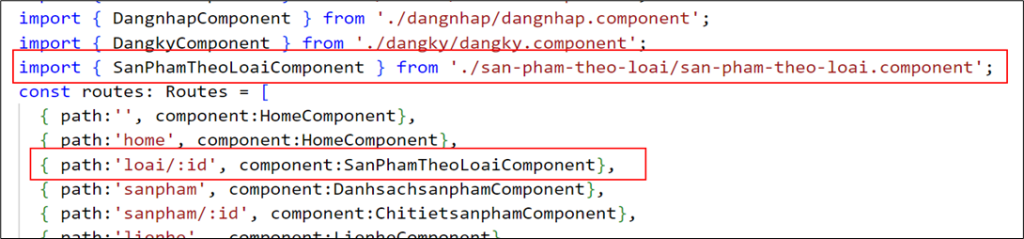

Tạo hàm trong service để request dữ liệu từ server
//du-lieu.service.ts
getSanPhamTheoLoai(idLoai:Number=0) {
    var url = `http://localhost:3000/sanpham?idLoai=${idLoai}&_sort=ngay&_order=desc`;
    return this.h.get<any>(url, {observe: 'response'});
}
getTenLoaiSanPham(idLoai:Number=0){
    var url = `http://localhost:3000/loaisp?id=${idLoai}`;
    return this.h.get<ILoaisp[]>(url);
}
Gọi hàm trong trong servive từ component
Gọi hàm trong trong servive từ components="has-inline-color has-vivid-green-cyan-color">//san-pham-theo-loai.component.ts
import { Component } from '@angular/core';
import { ActivatedRoute } from '@angular/router';
import { DuLieuService } from '../du-lieu.service';
import { ISanpham } from '../isanpham';
@Component({ selector: 'app-san-pham-theo-loai',
  templateUrl: './san-pham-theo-loai.component.html',
  styleUrls: ['./san-pham-theo-loai.component.css']
})
export class SanPhamTheoLoaiComponent {
  listSanPham:ISanpham[]=[];
  tenLoai:string="";
  idLoai:number=0;
  constructor(
     private d:DuLieuService,
     private route:ActivatedRoute
  ) { }
  ngOnInit(): void {
    this.idLoai = Number( this.route.snapshot.params['id'] );
    this.d.getTenLoaiSanPham(this.idLoai).subscribe (
      loai =>  { this.tenLoai= loai[0].tenLoai; }
    );
    this.d.getSanPhamTheoLoai(this.idLoai).subscribe (
      res =>  this.listSanPham = res
    );
  }
}
Hiện sản phẩm theo loại dùng Angular ra view
và khai báo
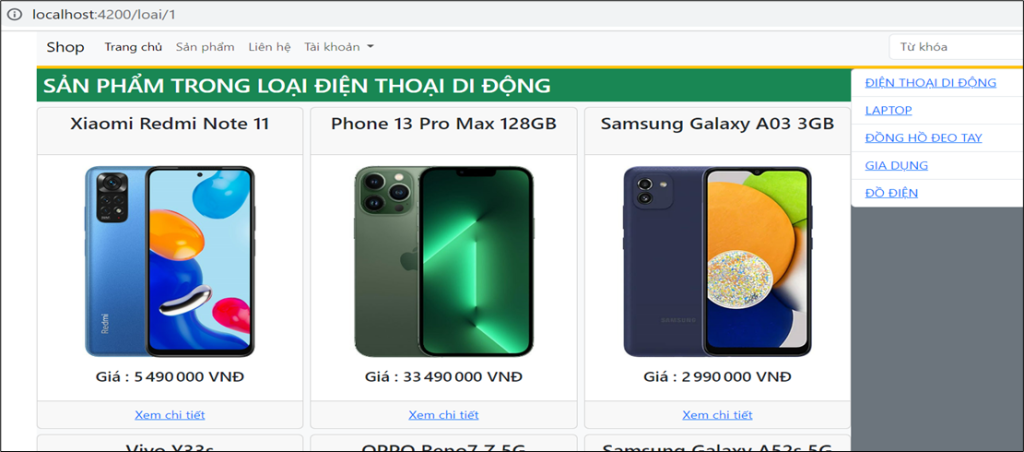
3. Trong hàm lấy dữ liệu server: chỉ lấy 1 trang
Hàm lấy sản phẩm cần có điều chình :
- Thêm tham số pageNum – số trang cần lấy, pageSize – số record trong 1 trang.
- Request gửi lên server bổ sung thêm biến _page và _limit.
- Sử dụng {observe:’response’} khi request để lấy giá trị trong http head>3. Trong hàm lấy dữ liệu server: chỉ lấy 1 trangount
//du-lieu.service.ts
getSanPhamTheoLoai(idLoai:Number=0, pageSize:number=1, pageNum:number=1) {
  var url = `http://localhost:3000/sanpham?idLoai=${idLoai}&_sort=ngay&order=desc`;
  url+= `&_page=${pageNum}&_limit=${pageSize}`;
  return this.h.get<any>(url , {observe: 'response'} );
}
4. Trong component: Tạo các biến và các hàm dùng cho phân trang
- Khai báo các biến pageNum – trang hiện hành, pageSize – số record trong 1 trang, total – tổng số record
- Khi gọi hàm getSanPhamTheoLoai: truyền tham số pageSize, pageNum
- Khi nhận response : lấy res.body lưu vào listSanPham và lấy biến X-Total-Count trong header lưu vào total (do json -server trả về )
4. Trong component: Tạo các biến và các hàm dùng cho phân trangid-green-cyan-color">//san-pham-theo-loai.component.ts
...
export class SanPhamTheoLoaiComponent {
  listSanPham:ISanpham[]=[];  tenLoai:string="";  idLoai:number=0;
  pageNum:number=1;
  pageSize:number=2;
  total: number = 0;
...
this.d.getSanPhamTheoLoai(this.idLoai, this.pageSize,this.pageNum ).subscribe (
     res => {
        this.listSanPham  = res.body ;
        this.total = Number(res.headers.get('X-Total-Count'));
      }
);
- Trong component (sau hàm ngInit) định nghĩa hàm chuyển đến trang để khi user click chọn 1 page thì gán giá trị mới cho pageNum và request lại
chuyenDenTrang( p: number){
    this.pageNum = p;
     this.d.getSanPhamTheoLoai(this.idLoai, this.pageSize, this.pageNum).subscribe (
      res => {
        this.listSanPham  = res.body ;
        this.total = Number(res.headers.get('X-Total-Count'));
      }
     );
}
5. Giới hạn lặp và hiện các link phân trang
Mở file san-pham-theo-loai.component.html
- Thêm lệnh paginate lúc lặp:
| paginate: { itemsPerPage: pageSize, currentPage: pageNum, totalItems: total}
- Cho hiện các link phân trang với lệnh
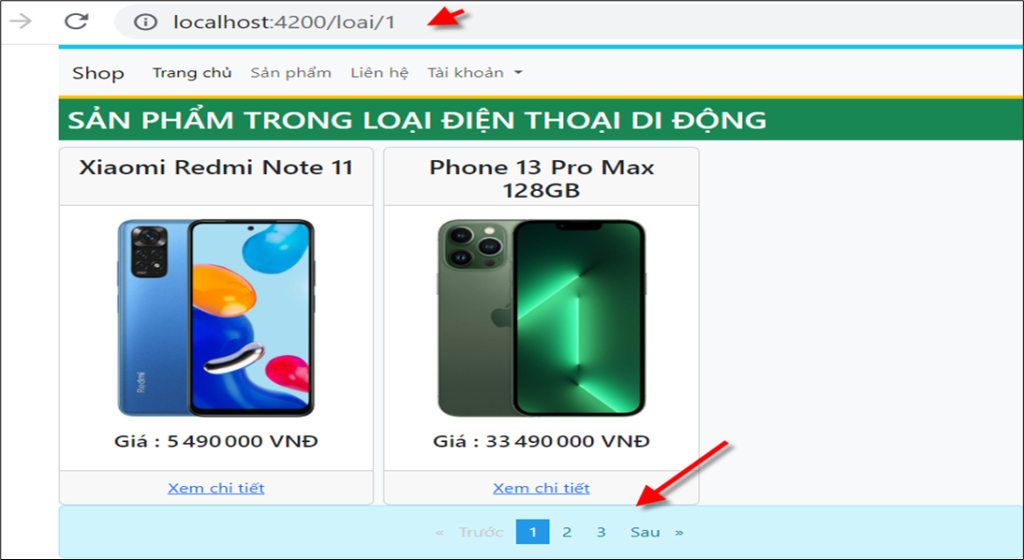
<pagination-controls (pageChange)="chuyenDenTrang($event)"
    previousLabel="Trước" nextLabel="Sau" [autoHide]="true" [responsive]="true">
</pagination-controls>>5. Giới hạn lặp và hiện các link phân tranglazy" decoding="async" width="1024" height="367" src="https://longnv.name.vn/wp-content/uploads/2023/02/image-33-1024x367.png" alt="" class="wp-image-6964" srcset="https://longnv.name.vn/wp-content/uploads/2023/02/image-33-1024x367.png 1024w, https://longnv.name.vn/wp-content/uploads/2023/02/image-33-300x107.png 300w, https://longnv.name.vn/wp-content/uploads/2023/02/image-33-768x275.png 768w, https://longnv.name.vn/wp-content/uploads/2023/02/image-33-696x249.png 696w, https://longnv.name.vn/wp-content/uploads/2023/02/image-33-1068x382.png 1068w, https://longnv.name.vn/wp-content/uploads/2023/02/image-33.png 1075w" sizes="auto, (max-width: 1024px) 100vw, 1024px" />
Test: Xem lại sẽ thấy thanh phân trang
Sau đây là các bài trong seris thực tập Angular bạn cần thực hiện tuần tự từ trên xuống để có project nhé:
- Đôi điều về Angular – P1
- Đôi điều về Angular – P2
- Hiện sản phẩm bán chạy
- Hiện sản phẩm mới dùng Angular
- Hiện loại sản phẩm dùng Angular
- Hiện sản phẩm theo loại dùng Angular
- Hiện chi tiết sản phẩm dùng Angular


