
Hiện chi tiết sản phẩm dùng Angular hướng dẫn tạo component để hiện chi tiết 1 sản phẩm lấy từ server về, hiện thêm các sản phẩm liên quan…
Yêu cầu
- Lấy chi tiết sản phẩm theo tham số, trình bày thông tin sản phẩm và tạo link
- Hiện sản phẩm liên quan, list ý kiến, form thêm ý kiến
- Trước khi thực hiện bài này, hãy xem bài sau và thực hiện theo đó trước nhé: https://longnv.name.vn/thuc-tap-angular/hien-san-pham-theo-loai-dung-angular
Chuẩn bị
- Chạy project Angular : Vào folder project và chạy lệnh sau
ng serve -o - Chạy Json server: Vào folder project và chạy lệnh
json-server -w db.json
Tạo component chi tiết sản phẩm
Trong folder project , chạy lệnh ng g c SanP>Tạo component chi tiết sản phẩm"wp-block-heading">Tạo routing cho component
Chức năng hiện chi tiết 1 sản phẩm là chức năng mới, cần có địa chỉ (path) riê>Tạo routing cho componentng ta cần định nghĩa routing mới để dẫn vào component . Mở file app-routing.module.ts và định nghĩa path sp trong mục routes: Test: Nhập địa chỉ http://localhost:4200/sp/1 sẽ thấy component chi tiết sản phẩm hiện ra Service của Angular là nơi viết các hàm tập trung phục vụ các component. Mở file du-lieu.service.ts để tạo h>Tạo hàm trong service để request dữ liệu từ servers="wp-block-preformatted">//du-lieu.service.ts
getSanPhamChiTiet(idSP:Number=0){
var url = `http://localhost:3000/sanpham?id=${idSP}`;
return this.h.get<ISanpham[]>(url);
}
Trong component chi tiết sản phẩm, chúng ta gọi hàm trong service để gán vào các biến để cho view hiện ra. Mở file san-pham-chi-tiet.component.ts và code: Gọi hàm trong trong servive từ componentle="background-color:rgba(0, 0, 0, 0)" class="has-inline-color has-vivid-green-cyan-color">//san-pham-chi-tiet.component.ts
import { Component } from '@angular/core';
import { ActivatedRoute } from '@angular/router';
import { DuLieuService } from '../du-lieu.service';
import { ISanpham } from '../isanpham';
@Component({ selector: 'app-san-pham-chi-tiet',
templateUrl: './san-pham-chi-tiet.component.html',
styleUrls: ['./san-pham-chi-tiet.component.css']
})
export class SanPhamChiTietComponent {
constructor(
private d:DuLieuService,
private route:ActivatedRoute
) { }
spChiTiet:ISanpham={
id:0, tensp:"", giasp:0,
solanxem:0, hinh:"",
mota:"", hot:0, ngay:"", idLoai:0
};
idSP:number=0;
idLoai:number=0;
tenLoai:string="";
ngOnInit(): void {
this.idSP = Number(this.route.snapshot.params['id']);
this.d.getSanPhamChiTiet(this.idSP).subscribe (
res => {
this.spChiTiet = res[0];
this.idLoai = this.spChiTiet.idLoai;
this.d.getTenLoaiSanPham(this.idLoai).subscribe(
d => this.tenLoai = d[0]['tenLoai']
);
}//res
);
}
}
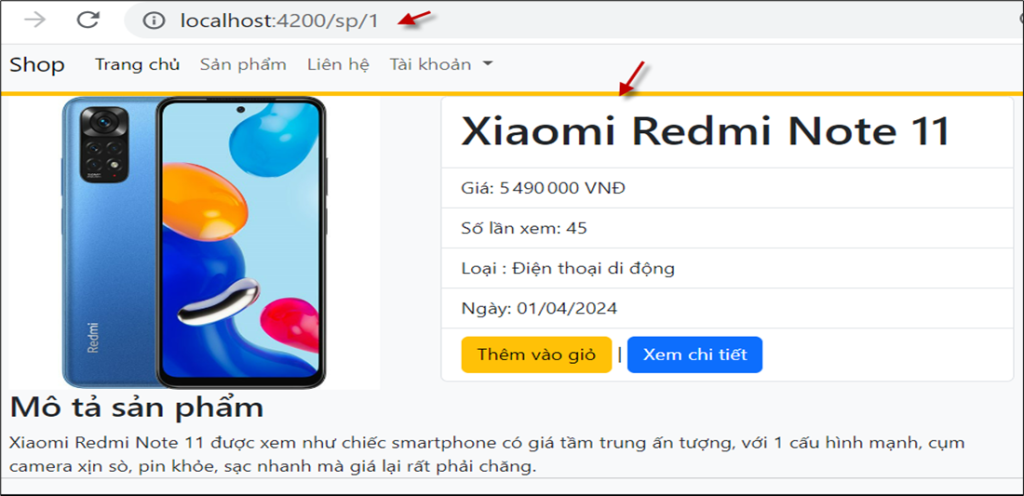
Giờ thì đến lúc hiện chi tiết sản phẩm dùng Angular. Dữ liệu đã có trong component rồi, chỉ việc mở file html của component cho hiện các giá trị ra . Mở san-pham-chi-tiet.component.html và code: Test: Mở san-pham-ban-chay.component.html và sửa link Xem chi tiết để được như sau Nếu muốn, bạn có thể tạo link tương tự bao quanh tên sản phẩm, và hình sản phẩm. Mở san-pham-moi.component.html và thực hiện tương tự như trong sản phẩm bán chạy Mở san-pham-theo-loai.component.html và thực hiện tương tự như trong sản phẩm bán chạy Chạy lệnh trong folder project : ng g c SanPhamLienQuan Nhúng vào sản phẩm chi tiết và truyền 2 tham số idLoai, số SP . Mở file san-pham-chi-tiet.component.html và nhúng Mở file san-pham-lien-quan.component.ts và code để Test Phù, mệt không? Nếu thế thì ngủ đi 🙂 . Thầy thì mệt quá rồi>2. Tạo component comment3. Nhúng component vào chi tiết sản phẩm Sau đây là các bài trong series thực tập Angular bạn cần thực hiện tuần tự từ trên xuống để có project nhé: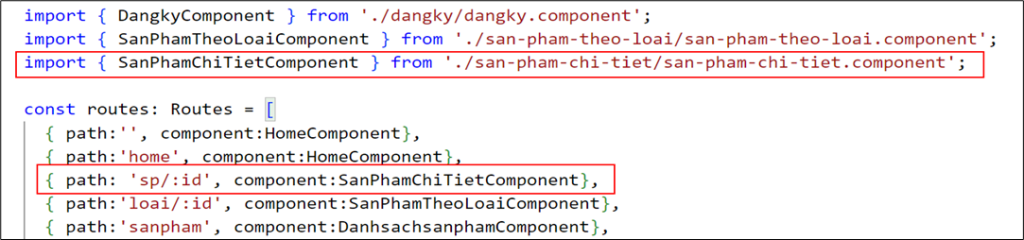

Tạo hàm trong service để request dữ liệu từ server
Gọi hàm trong trong servive từ component
Hiện sản phẩm trong view của component
Tạo link đến chức năng chi tiết sản phẩm
Tạo link đến chi tiết sản phẩm từ trong component sản phẩm bán chạy
<a href=”#” Tạo link >Tạo link đến chi tiết sản phẩm từ trong component sản phẩm bán chạyh2>/sp/{{sp.id}}” >Xem chi tiết</a>Tạo link đến chi tiết sản phẩm từ trong component sản phẩm mới
Tạo link đến chi tiết sản phẩm từ trong component sản phẩm theo loại
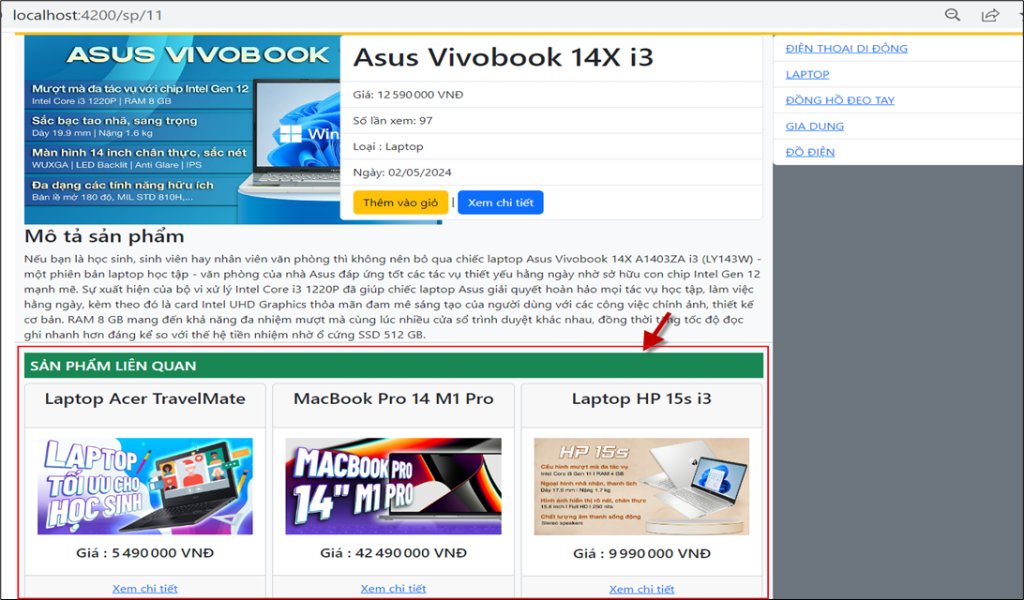
>Tạo link đến chi tiết sản phẩm từ trong component sản phẩm mớii tiết 1 sản phẩm, thường cần phải hiện thêm các sản phẩm liê>Tạo link đến chi tiết sản phẩm từ trong component sản phẩm theo loại component sản phẩm liên quan
2. Nhúng component và truyển tham số
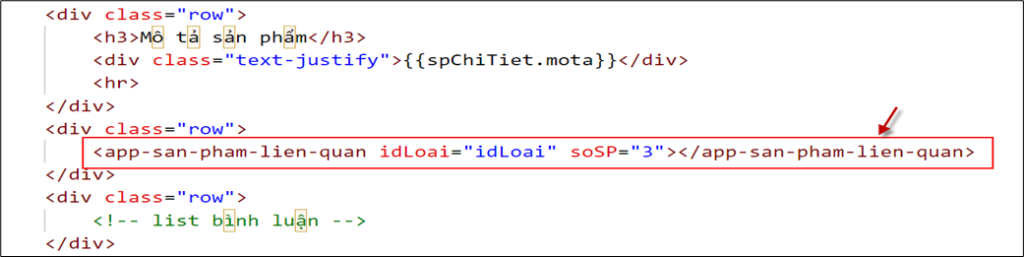 2. Nhúng component và truyển tham sốtps://longnv.name.vn/wp-content/uploads/2023/02/image-38-696x175.png 696w, https://longnv.name.vn/wp-content/uploads/2023/02/image-38.png 1041w" sizes="auto, (max-width: 1024px) 100vw, 1024px" />
3. Tiếp nhận tham số và gọi hàm
//san-pham-lien-quan.component.html
import { Component } from '@angular/core';
3. Tiếp nhận tham số và gọi hàm"has-inline-color has-vivid-red-color">import { Input } from '@angular/core';
import { DuLieuService } from '../du-lieu.service';
import { ISanpham } from '../isanpham';
import { SimpleChanges} from '@angular/core';
@Component({selector: 'app-san-pham-lien-quan',
  templateUrl: './san-pham-lien-quan.component.html',
  styleUrls: ['./san-pham-lien-quan.component.css']
})
export class SanPhamLienQuanComponent {
  @Input() idLoai:number =0;
  @Input() soSP:number =0;
  listSanPham:ISanpham[]=[];
  constructor( private d:DuLieuService  ) {}
  ngOnInit(): void { };
  ngOnChanges(changes: SimpleChanges) {
    console.log(changes);
    this.d.getSanPhamLienQuan(this.idLoai, this.soSP).subscribe(
      data => { this.listSanPham= data; console.log(data); }
    );
  }
}//export
4. Định nghĩa hàm lấy dữ liệu từ server
//du-lieu.service.ts
getSanPhamLienQuan(idLoai:number=0, soSP:number=0){
    var url = `http://localhost:3000/sanpham?idLoai=${idLoai}&_limit=${soSP}`;
    return this.h.get<ISanpham[]>(url);
}
5. Hiện dữ liệu trong view
<!-- san-pham-lien-quan.compoment.html-->
<h5 class="bg-success p-2 text-white">SẢN PHẨM LI>4.  Định nghĩa hàm lấy dữ liệu từ server-md-2 row-cols-xl-3 g-2">
    <div class="col" *ngFor="let sp of listSanPham" >
        <div class="card text-center">
            <div class="card-header">
                <h3 class="h4" style="height:45px">5.  Hiện dữ liệu trong view}</h3>
            </div>
            <div class="card-body">
              <img class="img-fluid" src="{{sp.hinh}}">
              <p class="h5 mt-3">
                Giá : {{sp.giasp|number:'1.0-0':'fr' }} VNĐ
              </p>
            </div>
            <div class="card-footer">
                <a href="#" routerLink="/sp/{{sp.id}}">Xem chi tiết</a>
            </div>
        </div>
    </div>
</div>
Comment sản phẩm
1. Tạo table trên json server
2. Tạo component comment
3. Nhúng component vào chi tiết sản phẩm
4. Tạo form comment sản phẩm
5. Gửi dữ liệu lên server để lưu
6. Hiện danh sách comment của sản phẩm
4. Tạo form comment sản phẩm5. Gửi dữ liệu lên server để lưu 6. Hiện danh sách comment của sản phẩmend">c-section-end">thêm tài liệu chính thức của Angular thì lên đây https://angular.io/docs


